
Introduction
The following content is compiled by VIPSTAR in combination with X/social media public content and is for reading and research reference only.
focus
- Follow the trend and install OpenClaw, which is popular all over the Internet, but after less than a day of enjoying it, it just sits there and collects dust?
- After pretending, I opened it and looked confused: Other people’s lobsters can help with work 24 hours a day, but your lobster doesn’t know anything about it, and can’t even remember your name? I just pretended to have a bunch of Internet celebrity skills, or I didn’t know how to use them…
Remark
For parts involving rules, benefits or judgments, please refer to the original expression and latest official information of Achuan | AI thinking.
Follow the trend and install OpenClaw, which is popular all over the Internet, but after less than a day of enjoying it, it just sits there and collects dust?
After pretending, I opened it and looked confused: Other people’s lobsters can help with work 24 hours a day, but your lobster doesn’t know anything about it, and can’t even remember your name? You blindly installed a bunch of Internet celebrity skills, but you either don’t know how to use them, or you can’t use them. A good open source artifact, but you just used it as an advanced chat box?
There are many comments under the last popular article, all of which are newbies who have just installed OpenClaw and are stuck in Novice Village and don’t know where to go. I’ve been stuck in this trap for almost a month.
From a pure novice who doesn’t even understand skill, to an exclusive wage earner who plays lobsters as he is on call.
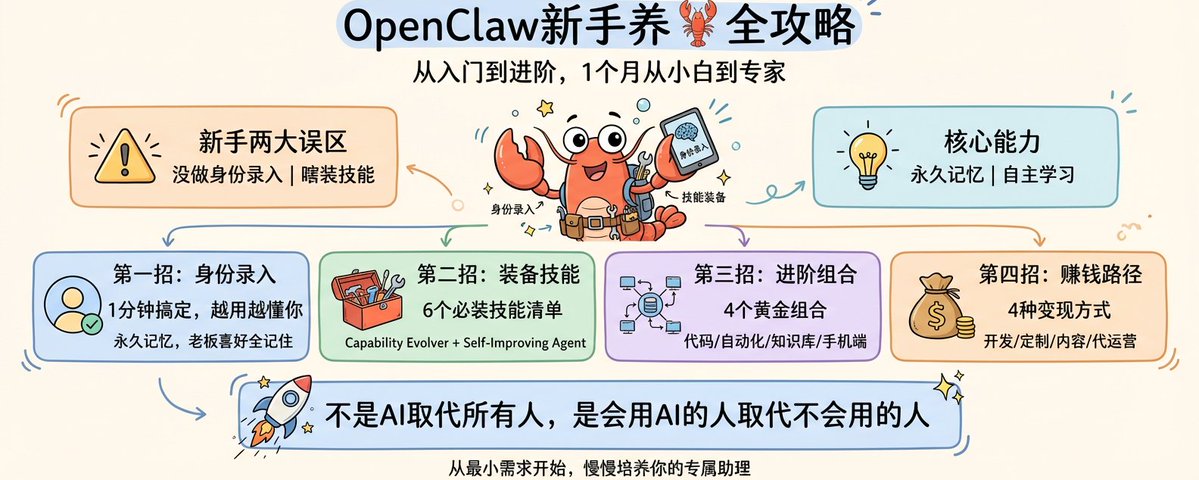
Today, I will share with you this complete guide to raising 🦞 from entry level to advanced level.
It is all practical information that has been tested by myself and is effective. You don’t need to understand complicated codes in the whole process. You can just copy and paste it. If you follow this, your lobster will understand you better and be able to fight better the more you use it!
The first step: first do the “identity entry” for the lobster, it can be done in 1 minute
This is the step most easily overlooked by novices, and it is also the most critical step in determining whether your lobster is an “artificial retard” or a “dedicated assistant”.
After installing OpenClaw, many people come up and ask, “What can you do?” or “Write something for me.” But you haven’t even told it who you are, what you want to do, or what your preferences are. How can it give you the answer you want? The most outstanding core capability of OpenClaw is permanent memory.
To put it bluntly, this step is to give your lobster “pre-job training” so that it knows who it works with, what the boss’s preferences, habits, and work rhythm are, so that it can accurately follow your ideas in future work.
Novices can directly copy and modify it, and it can be done in 1 minute. Just send the following information to Lobster, and be sure to add a sentence at the end: Please remember the above content forever, this is my basic personal information.
My name is XX, I am XX years old, I do XX work in XX city, and I am mainly responsible for XX content. I usually don’t like too formal a way of speaking, so you can be more casual when communicating with me. I go to work at XX o’clock every day and usually go to bed at XX o’clock. I am currently in XX / have XX habits, please remind me of relevant content.
Just a few words, no need to write a short composition, no need to be very formal. You can also add information at any time. Tell it today that you like fitness, and tomorrow tell it that you are learning French. It will remember these contents one by one, and the more you use it, the better it will understand you.
The second move: Equip your lobster, a list of skills that novices must equip
Let me first explain it to newcomers. There are two words that 90% of people confuse: skill and plug-in.
A skill is a skill that a lobster can learn – such as helping you search the web, send emails, organize documents, and control the browser. Each skill is a job that it can directly do for you.
Plug-ins are just to add peripherals to the lobster – such as adding a voice input box and changing the skin. They are the icing on the cake and novices don’t need to touch them first. Practice your lobster skills first, and then do all the bells and whistles.
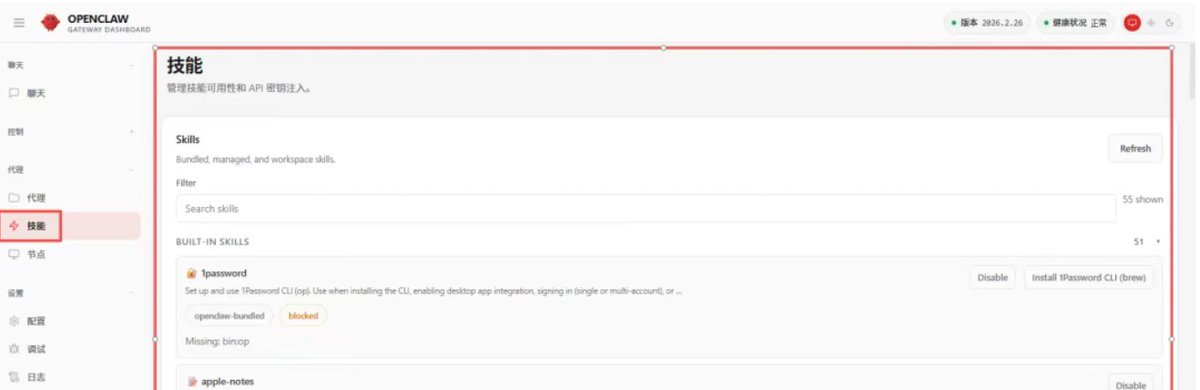
Where can I install skills? 3 channels, all of which can be used directly by novices
Channel 1: ClawHub official market (novices rush with eyes closed)
Official website:https://clawhub.ai
The official son, you can directly enter OpenClaw, install it with one click, and have official security scans, so you don’t have to worry about stepping on pitfalls, and there is zero threshold for operation. The installation command is super simple
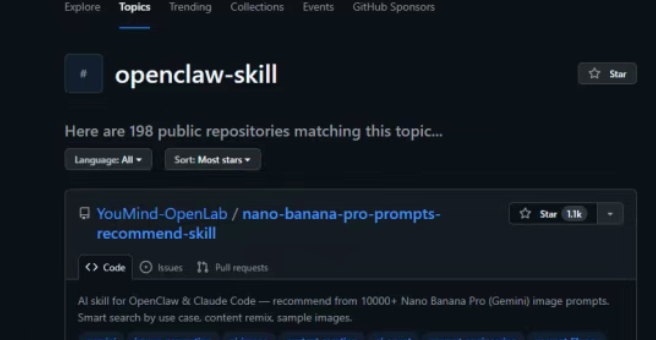
Channel 2: GitHub open source community (if you like to mess around, go directly)
address:https://github.com/topics/openclaw-skill
Here are all the skills created by the big developers voluntarily, with more complete functions and more subdivisions. Currently, there are 200+ open source warehouses. I particularly recommend a treasure warehouse for lazy people: awesome-openclaw-skills. From the official 13,000+ skills, the boss has screened out all junk, duplication, and malicious ones, and sorted out 5,400+ high-quality skills. Just browse here to find skills.
Channel 3: Fishery market (a treasure exclusively for Chinese users)
address:https://openclawmp.cc
The most popular lobster community in the Chinese circle is all based on technologies that are used by Chinese people, such as Feishu, WeChat, Bilibili, and Chinese financial report analysis. They are much more down-to-earth than overseas platforms.
A list of must-have skills for beginners, 6 carefully selected ones, all of which are useful
I’m not going to make you guys a bunch of fancy stuff, just pick something that you can use for beginners and you can feel the effect immediately, it doesn’t take up resources, and it’s risk-free, and you won’t be able to use it if there are too many.
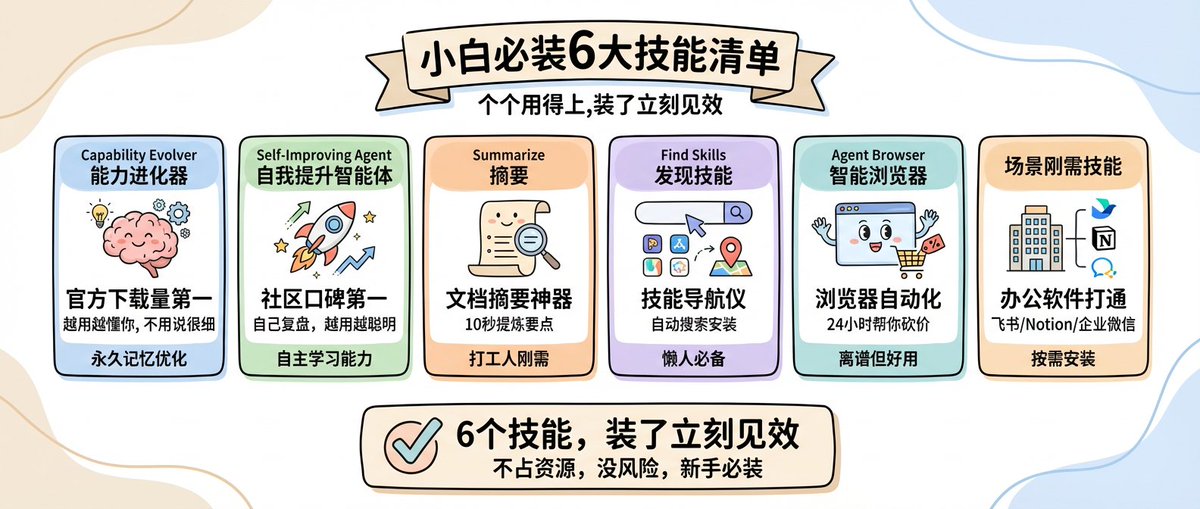
Capability Evolver – No. 1 in downloads on the official market, with 35,000+ people installed. It does not do specific work for you, but makes your lobster more comfortable the more you use it. It will analyze your usage habits and automatically help Lobster optimize your reply methods and work logic. As you use it, you will find that Lobster understands your thoughts more and more, without you having to speak in detail every time.
Self-Improving Agent – the most popular skill in the community, and a golden partner with the one above. The above one is about optimizing the cooperation with you, and this one is about letting the lobster grow on its own. Every time it completes a task, it will review it by itself to see where it went wrong and where it can be optimized. Write it down so that you won’t make the same mistake again next time. The more you use it, the smarter it becomes.
Summarize (Document Summary) – There is no such thing as an artifact that is immediately effective when installed by a novice. Whether it’s a contract, report, meeting minutes, paper, or web page, PDF, audio and video, you throw it to it, and the core points can be extracted in 10 seconds. You don’t have to chew through dozens or hundreds of pages of content yourself. It’s just what workers need.
Find Skills – A must-have skills navigator for lazy people. After installing it, you don’t have to go to various markets to search for skills. You can just say “find me a skill that can do XX” and it’s done.
Agent Browser (browser automation) – Put hands and eyes on a lobster. After installing it, Lobster can operate the browser like a human
Skills that are needed in scenarios (installed on demand) – Workers use Feishu / Notion / Enterprise WeChat to directly search for skills with corresponding names and open office software with one click; developers can directly install GitHub Skill to help you change code, review PRs, and manage issues; those who want to install daily reminders can install Weather, which can automatically check the weather and send you reminders without using an API key.
I would like to add a question that novices often ask: What should I do if Lobster cannot recognize the skills I wrote? 90% of the time, the description of your skills is too vague. Novices can also install Skill-Creator directly and let Lobster help you write skills automatically with zero code.
The third trick: Advanced golden combination, 4 ways to make the lobster work for you 24 hours a day
Many people have installed a bunch of skills, but they still find it difficult to use lobster. Why? Because if you let one person do all the work, he will definitely not be able to do it well. The core of advancement is to let OpenClaw be your “general manager”, understand your ideas, break down the tasks, and then assign professional tools to do the work, directly doubling your capabilities.
We have compiled for you 4 combinations that are the most popular in the community and can be used by beginners. Just follow them.
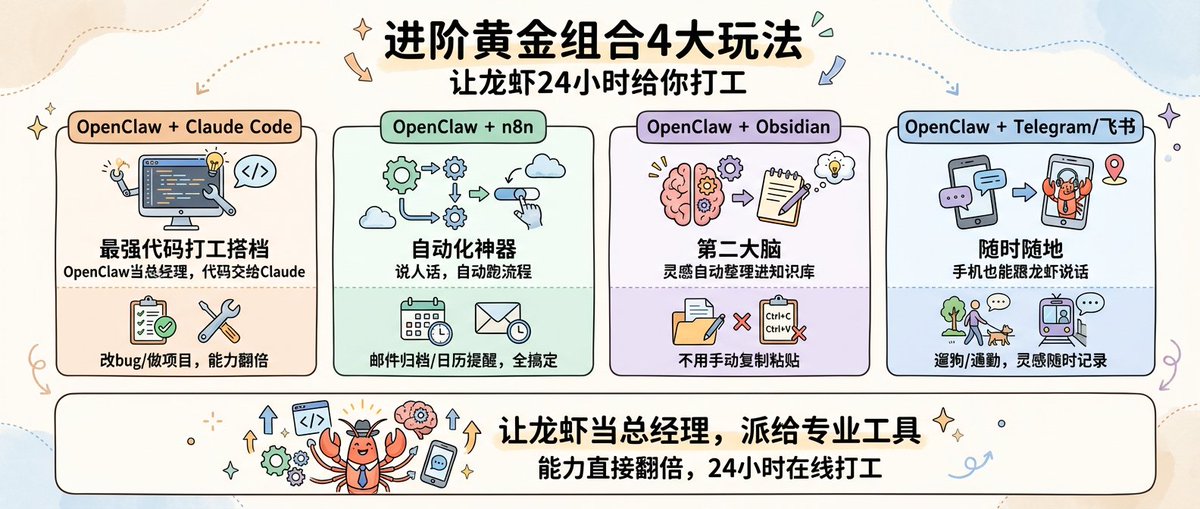
OpenClaw + Claude Code = The strongest code working partner
There is no one that is the most popular group on the Internet right now. Let me explain the division of labor clearly to you: Claude Code specializes in writing code, fixing bugs, and working on projects. It has full capabilities, but it cannot remember your preferences and does not know your project background. It has to say it again every time you use it. OpenClaw can just make up for this pitfall. It remembers all your needs, project history, and work habits.
OpenClaw + n8n = Automation artifact, let it do all the repetitive work
n8n is an open source automation tool that can connect all your software. However, if you use it alone, you have to drag and drop the configuration yourself, which has a high threshold. After combining with OpenClaw, you only need to speak human words, and it can automatically run the process for you.
OpenClaw + Obsidian / Knowledge Base = Your Exclusive Second Brain
A must-read for knowledge workers and creators. Obsidian is a tool used by many people to take notes and build a knowledge base. After it is connected with OpenClaw, all the inspirations, ideas, and useful information you have chatting with Lobster will be automatically organized into the knowledge base for you, and it can also be associated with your previous notes, eliminating the need for you to manually copy and paste.
OpenClaw + Telegram / Feishu = Lobster follows you anytime, anywhere
This combination directly changes the way you use lobster. In the past, you could only sit in front of the computer and use Lobster. After you open Telegram or Feishu, you can use your mobile phone to talk to it anytime, anywhere, send text, voice, and pictures, and it can handle it all, and the results will be returned directly to your chat box.
The fourth trick: 4 real and implementable 🦞 monetization paths
Many people ask me, if I understand how to play lobster, can I make money from it? Of course you can. Some people are already making money from this. From things that novices can do to those with technical content, we have sorted them out for you.
Develop skills – the most direct way. You develop corresponding skills for certain segmented needs, such as cross-border e-commerce operations, self-media multi-platform publishing, and Feishu automation for small and medium-sized enterprises.
Technical services – Many bosses, businesses, and self-media want to have their own AI assistants, but they don’t know how to install, match, or process them. You can turn your experience into services and help customers build exclusive lobster workflows and customize industry solutions.
Content Creation – If you are good at explaining complex things clearly, you can directly turn your lobster farming experience, pitfall guides, and gameplay tips into tutorials, columns, and communities, and monetize your knowledge by paying for it.
Agent operation – Nowadays, many brands and businesses want to build their own AI Agent, but they cannot implement it or operate it. You can use Lobster as the core to help them build and operate a dedicated AI assistant to get through to a customer, and there will be no worries about subsequent repurchases and referrals.
Finally, I would like to say something that touches my heart
Many people think that OpenClaw is difficult and requires understanding code and technical skills, but it is not at all.
Installing OpenClaw is only the first step. It is not a tool that you can install once and for all, but a workman that you need to slowly run in and cultivate. There is no need to make complex gameplay at the beginning, start with the smallest requirements and let it run first.
Let it remind you about the weather today, let it help you organize meeting minutes tomorrow, and let it help you handle emails the day after tomorrow. Slowly, you will find that it understands you better and better, and you become more and more able to use it.
Don’t be afraid that you are a novice or that your needs are stupid. All experienced people start from the step of “let the lobster run first”.
You don’t have to do all the above four tricks. Just by mastering the first two tricks, your lobster will be better than 90% of novices. It is effective in personal testing!
(Oh, by the way, if you haven’t found a stable and scientific way to surf the Internet 🪜, or you don’t have a safe overseas static residential IP, you can find a guide that is also suitable for novices on my homepage~)
What fun automation have you implemented with Lobster? Let’s chat in the comment area and I’ll help you see if you can optimize it~
source
author:Achuan | AI thinking
Release time: March 3, 2026 09:23
source:Original post link
Editorial comments
This article “X Import: Achuan | AI thinking – Can you only chat after installing OpenClaw? The only thing you need to be a professional farmer is this beginner’s guide” from the X social platform, written by Achuan | AI thinking. Judging from the completeness of the content, the density of key information given in the original text is relatively high, especially in the core conclusions and action suggestions, which are highly implementable. Follow the trend and install OpenClaw, which is popular all over the Internet, but after less than a day of enjoying it, it just sits there and collects dust? After pretending, I opened it and looked confused: Other people’s lobsters can help with work 24 hours a day, but your lobster doesn’t know anything about it, and can’t even remember your name? You blindly installed a bunch of Internet celebrity skills, but you either don’t know how to use them, or you can’t use them. A good open source artifact, but you just used it as an advanced chat box? There are many comments under the last popular article, all of which are newbies who have just installed OpenClaw and are stuck in Novice Village and don’t know where to go. I’ve been stuck in this trap for almost a month…. For readers, its most direct value is not “knowing a new point of view”, but being able to quickly see the conditions, boundaries and potential costs behind the point of view. If you break this content down into verifiable judgments, it would at least include the following aspects: Follow the trend and install OpenClaw, which is popular all over the Internet, only to let it gather dust after less than a day of being cool? ; After pretending, he opened it and looked confused: Other people’s lobsters can help work 24 hours a day, but your lobster doesn’t know anything about it, and can’t even remember your name? I blindly pretended to have a bunch of internet celebrity skills, or I didn’t know how to use them…. Among these judgments, the conclusion part is often the easiest to disseminate, but what really determines the practicality is whether the premise assumptions are established, whether the sample is sufficient, and whether the time window matches. We recommend that readers, when quoting this type of information, give priority to checking the data source, release time and whether there are differences in platform environments, to avoid mistaking “scenario-based experience” for “universal rules.” From an industry impact perspective, this type of content usually has a short-term guiding effect on product strategy, operational rhythm, and resource investment, especially in topics such as AI, development tools, growth, and commercialization. From an editorial perspective, we pay more attention to “whether it can withstand subsequent fact testing”: first, whether the results can be reproduced, second, whether the method can be transferred, and third, whether the cost is affordable. The source is x.com, and readers are advised to use it as one of the inputs for decision-making, not the only basis. Finally, I would like to give a practical suggestion: If you are ready to take action based on this, you can first conduct a small-scale verification, and then gradually expand investment based on feedback; if the original article involves revenue, policy, compliance or platform rules, please refer to the latest official announcement and retain the rollback plan. The significance of reprinting is to improve the efficiency of information circulation, but the real value of content is formed in secondary judgment and localization practice. Based on this principle, the editorial comments accompanying this article will continue to emphasize verifiability, boundary awareness, and risk control to help you turn “visible information” into “implementable cognition.”