


Editor’s Brief
If you have been looking for practical AI beginner tips to actually get started without drowning in jargon, this guide is the clearest entry point I have seen in months. Originally written by Achuan for the X platform, it addresses the single most common frustration among new AI agent users: the tool feels brilliant on day one and broken by day fourteen. The author’s answer is a mindset shift — from treating an AI agent as a magic wand to managing it like a new hire who needs clear job descriptions, structured instructions, and regular feedback. Ten tips, zero code required. The focus keyphrase here is not accidental: these are genuinely practical AI beginner tips, tested in real workflows, not theoretical frameworks. Read it once end-to-end, then return to tips 1, 2, and 7 first.
Key Takeaways
- Write a Job Description, not a self-introduction. Structured role definitions using four modules outperform conversational intros every time. This is the single highest-ROI change a beginner can make.
- The three-sentence instruction formula eliminates most errors. Core task + quality standard + delivery format. Any request that cannot fit this template is not yet well-defined enough to delegate.
- Session and memory hygiene directly control your API bill. One topic per session, regular pruning of the MEMORY.md file, and the /status command together can cut token consumption by up to 50%.
- Skill overload is a real trap. Three core skills — summarisation, skill discovery, and skill vetting — cover ninety percent of daily needs for beginners. Install others only when a concrete use case demands them.
- Split your workload between a main and a lightweight agent clone. Using a high-tier model to set a weather reminder is the AI equivalent of hiring a senior consultant to do your filing. The cost difference is not trivial.
- Human confirmation rules are non-negotiable for autonomous tasks. Any agent action that touches external platforms, files, or money should require explicit approval. One line added to every system prompt provides this safety net.
- Five minutes of weekly review training compounds over time. Correcting the same three mistakes each week and reinforcing what works well is the mechanism by which a general-purpose agent becomes a personalised assistant.
NovVista Editorial Comment
The timing of this guide is instructive. We are roughly eighteen months into the consumer AI agent wave, and the pattern is now predictable: a wave of enthusiastic adopters installs an agent framework, spends a weekend automating small tasks, and then quietly abandons the tool by the end of the month. The complaint is always some version of “it stopped working” or “it costs too much.” Achuan’s ten tips are a direct response to this churn, and they deserve a closer read than a viral thread usually gets.
What the guide gets right above all else is the emphasis on structure as the primary user skill. The practical AI beginner tips that generate the most durable value — the job description template, the three-sentence formula, the weekly review session — are not technical at all. They are project management disciplines translated into an AI context. The irony is that these same disciplines are what knowledge workers are told to apply to their human colleagues, and most people never fully adopt them there either. The AI agent simply makes the cost of vagueness immediate and financial, which is a faster feedback loop than most management environments allow.
The economics section is where the guide quietly does its most important work. For individual users and small teams, the distinction between a “main force” model and a “lightweight” model for chores is not a nice-to-have optimisation — it is the difference between a sustainable tool and an unbudgeted monthly expense. The getting started phase for AI tools almost always underestimates this running cost, and guides that address it honestly are genuinely scarce.
One area where we would supplement Achuan’s advice: the “self-healing” error protocol in Tip 7 is excellent for runtime issues, but users should develop a habit of logging which errors recur. A recurring error is usually a signal about a structural problem in the system prompt or the skill configuration — not a one-time glitch. Feeding logs back to the agent for plain-English diagnosis is the right starting move, but a recurring pattern warrants revisiting the job description from Tip 1.
For NovVista readers who are at the very beginning of their AI agent journey, the most actionable takeaway from this entire piece is also the simplest: start with tips 1, 2, and 9. A clear job description, a structured instruction format, and a human confirmation rule will prevent the three most common failure modes before they appear. Everything else in the guide is a refinement layered on top of that foundation.
Editor’s Brief
A practical guide to optimizing OpenClaw (popularly known as "Lobster"), an AI agent framework. The author addresses common frustrations—such as poor instruction following, high API costs, and system errors—by shifting the user's mindset from "casual chatter" to "managerial oversight." The focus is on structured prompting, memory management, and cost-effective task delegation.
Key Takeaways
- Structured Role Definition:** Replace rambling introductions with a formal "Job Description" template to ensure the agent understands its specific boundaries and objectives.
- The Three-Sentence Formula:** Streamline requests by defining the core task, the quality standard, and the exact delivery format to eliminate ambiguity.
- Memory and Token Hygiene:** Prevent performance degradation and high costs by starting new sessions for different topics and manually pruning the "MEMORY.md" file.
- Agent Bifurcation:** Use high-tier models (like Claude 3.5 Sonnet) for complex reasoning and cheaper, faster models (like Haiku or local minis) for routine tasks like weather checks or scheduling.
- Self-Healing and Safety:** Address technical errors by feeding logs back to the agent for "plain English" fixes, and implement a "Human Confirmation" rule for any external actions like sending emails or spending money.
Editorial Comment
The honeymoon phase with DIY AI agents usually lasts about forty-eight hours. You install a framework like OpenClaw, watch it perform a few automated tricks, and feel like you’re living in the future. Then the friction sets in. The agent forgets what you told it yesterday, it hallucinates a file path, or worse, you get an API bill that looks like a car payment. Achuan’s guide is a necessary cold shower for the "novice village" of AI users who are currently stuck in this trough of disillusionment.
The most striking takeaway here isn't the technology itself, but the shift in human behavior required to make it work. We’ve been conditioned by search engines to use keywords and by early chatbots to use conversational filler. Achuan argues for a managerial approach. If you hire a human assistant and give them vague, rambling instructions, they will fail. Why expect more from a script? The "Job Description" tip is a classic example of reducing operational noise. By forcing the user to define a "standard" and a "delivery format," it moves the interaction from a guessing game to a professional transaction.
There is also a very grounded discussion on the economics of AI. For many hobbyists, the "burn rate" of tokens is the silent killer of productivity. The advice to split tasks between "主力" (Main) and "轻量" (Lightweight) models is standard practice in enterprise circles but often overlooked by individuals. Using a top-tier model to check the weather or summarize a grocery list is like hiring a partner at a law firm to do your filing. It’s a waste of resources. By delegating "雜活" (chores) to cheaper models, you extend the life and utility of the system.
However, the most practical advice for a non-technical audience is the "self-healing" protocol for errors. Most people see a block of terminal code or a JSON error and immediately close the program. Achuan’s suggestion—to simply paste the error back to the agent with a "explain this to me like I’m five" prompt—is the ultimate bridge over the technical gap. It treats the agent as its own debugger, which is arguably its most powerful feature for a novice.
Safety remains the elephant in the room. As we move toward "Action-Oriented" AI—agents that can actually click buttons and send messages—the risk of a "hallucination-led disaster" increases. The "Human Confirmation" rule is a non-negotiable safety net. It’s a reminder that while we want automation, we shouldn't want autonomy without accountability.
Ultimately, this guide highlights that the "intelligence" of an AI agent is often a reflection of the user’s ability to provide structure. The "Lobster" isn't broken; it’s likely just poorly managed. For those willing to put in the five minutes of "weekly training" and memory pruning Achuan suggests, the transition from a "useless toy" to a "functional tool" is entirely achievable. It’s about moving away from the magic-wand expectation and toward a workflow-maintenance mindset. Success in the AI era seems to require less coding knowledge and more "middle management" sensibility.
Introduction
The following content is compiled by NOVSITA in combination with X/social media public content and is for reading and research reference only.
focus
- I followed the trend and installed the popular OpenClaw lobster, but after using it for half a month, the more I used it, the more useless it became?
- Other people’s lobsters can work automatically 24 hours a day, but your lobsters don’t know what to ask and can’t even understand what you say. Others can make lobsters run through the entire process with just one sentence, but your lobsters either…
Remark
For parts involving rules, benefits or judgments, please refer to the original expression and latest official information of Achuan | AI thinking.
Editorial comments
This article “X Import: Achuan | AI thinking – Get out of the Novice Village! 10 Novice Level Zero-Threshold Raising Tips” from the X social platform, written by Achuan | AI thinking. Judging from the completeness of the content, the density of key information given in the original text is relatively high, especially in the core conclusions and action suggestions, which are highly implementable. I followed the trend and installed the popular OpenClaw lobster, but after using it for half a month, the more I used it, the more useless it became? Other people’s lobsters can work automatically 24 hours a day, but your lobsters don’t know what to ask and can’t even understand what you say. Others can make lobsters run through the entire process with just one sentence, but your lobsters either operate blindly or report errors like crazy? Don’t panic! It’s not that lobster is hard to use, it’s just that you haven’t figured out the tips for using it. After going through the pits for almost a month and trying out various ways to play in the community, I compiled these 10 tips for raising 🦞 that novices can use without any threshold. No need to write…. For readers, its most direct value is not “knowing a new point of view”, but being able to quickly see the conditions, boundaries and potential costs behind the point of view. If this content is broken down into verifiable judgments, it would at least include the following aspects: I followed the trend and installed OpenClaw Lobster, which is popular all over the Internet. After using it for half a month, the more I use it, the more useless it becomes? ;Other people’s lobsters can work automatically 24 hours a day, but your lobsters don’t know what to ask, and can’t even understand what you say; others can make the lobsters run through the entire process with just one sentence, but your lobsters either… Among these judgments, the conclusion part is often the easiest to disseminate, but what really determines the practicality is whether the premise assumptions are established, whether the sample is sufficient, and whether the time window matches. We recommend that readers, when quoting this type of information, give priority to checking the data source, release time and whether there are differences in platform environments, to avoid mistaking “scenario-based experience” for “universal rules.” From an industry impact perspective, this type of content usually has a short-term guiding effect on product strategy, operational rhythm, and resource investment, especially in topics such as AI, development tools, growth, and commercialization. From an editorial perspective, we pay more attention to “whether it can withstand subsequent fact testing”: first, whether the results can be reproduced, second, whether the method can be transferred, and third, whether the cost is affordable. The source is x.com, and readers are advised to use it as one of the inputs for decision-making, not the only basis. Finally, I would like to give a practical suggestion: If you are ready to take action based on this, you can first conduct a small-scale verification, and then gradually expand investment based on feedback; if the original article involves revenue, policy, compliance or platform rules, please refer to the latest official announcement and retain the rollback plan. The significance of reprinting is to improve the efficiency of information circulation, but the real value of content is formed in secondary judgment and localization practice. Based on this principle, the editorial comments accompanying this article will continue to emphasize verifiability, boundary awareness, and risk control to help you turn “visible information” into “implementable cognition.”
I followed the trend and installed the popular OpenClaw lobster, but after using it for half a month, the more I used it, the more useless it became?
Other people’s lobsters can work automatically 24 hours a day, but your lobsters don’t know what to ask and can’t even understand what you say. Others can make lobsters run through the entire process with just one sentence, but your lobsters either operate blindly or report errors like crazy?
Don’t panic! It’s not that lobster is hard to use, it’s just that you haven’t figured out the tips for using it.
After going through the pits for almost a month and trying out various ways to play in the community, I compiled these 10 tips for raising 🦞 that novices can use without any threshold.
There is no need to write a line of complex code or understand the underlying technology. Just copy and paste and follow the instructions. Your lobster can also transform from an “artificial retard” to a “dedicated assistant” in seconds. The more you use it, the better it will understand you and the smoother it will become!
Tip 1: Write a “job description” for Lobster, which is 10 times more useful than writing a self-introduction in a running account
[Pain points for stepping on pitfalls]
Many novices use it for the first time and write a long anecdote to introduce themselves to Lobster, with a few sentences here and there. Lobster simply cannot grasp the key points, still answers the wrong questions, and cannot remember your core requirements.
[Practical operation for beginners]
Don’t write a short essay, use a structured “job description” template, write it in 4 modules, put only key information, and add a mandatory memory instruction at the end. Newbies can just copy and change the content:
【Actual effect】
Lobster instantly grasps your positioning and will never answer questions that are wrong. Replies will always step on your ideas and will not blindly give you irrelevant content. It can accurately adapt to your habits in the first conversation.
Tip 2: 3-sentence instruction formula, lobster will never “understand it wrong” again
[Pain points for stepping on pitfalls]
The most common mistake for noobs is when they say a long paragraph of vague words, such as “Write a weekly report for me”, but it turns out that what you wrote is not what you wanted at all. You waste half an hour changing it over and over again, and the more you use it, the more popular it becomes.
[Practical operation for beginners]
Use this fixed 3-sentence formula for any command, with zero threshold, and you can get the results you want in one go:
- What do I want you to do (clear the core tasks, don’t be vague)
- What standards do I want (clear format, tone, word count, reference direction)
- What will be delivered to me in the end (clear the output format, such as 3 points, markdown format, send me Feishu)
❌ Wrong command: Help me write a weekly report
✅ Correct instructions:
- I want you to help me write a weekly work summary for the Internet operation position
- Write according to the 4 modules of “work completed this week + data results + next week’s plan + problems encountered”, with a formal tone, and no more than 3 pieces of content in each module
- Finally, I compiled it into a streamlined version of the text that can be copied directly to the corporate WeChat without unnecessary formatting.
【Actual effect】
A single instruction can produce the expected content without repeated modifications, and the efficiency is directly doubled. There will no longer be the situation of “I say something and another says something else”.
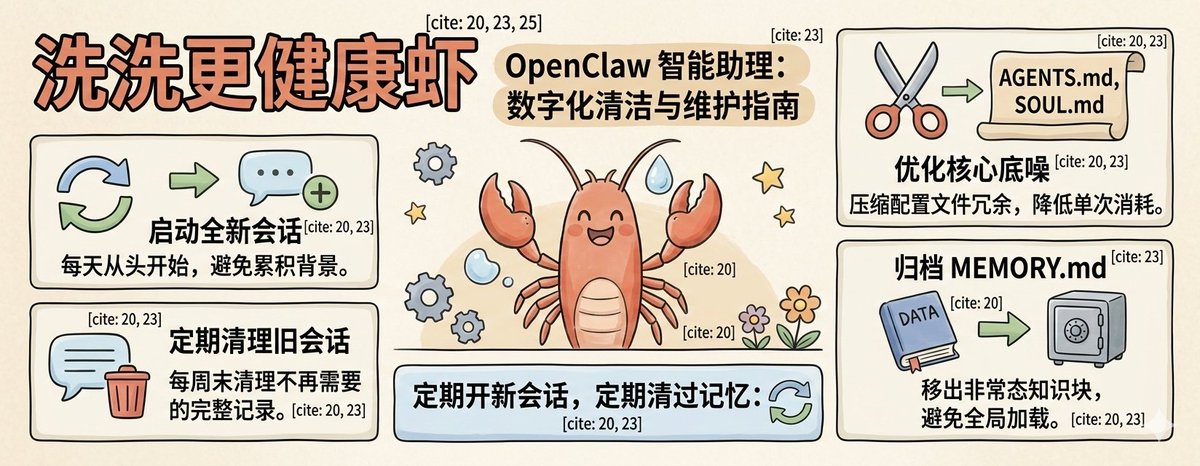
Tip 3: “Clean up the memory” of lobster regularly. The more you use it, the less stupid you will be. You can also save half the money.
[Pain points for stepping on pitfalls]
Many people use a session to the end, with thousands of chat records piled up. The lobster is getting slower and slower, and the answers are getting more and more confusing. They are also disturbed by chat records from eight hundred years ago. At the same time, tokens are burned like crazy, and API bills are rising.
[Practical operation for beginners]
2 zero-cost operations can be done in 1 minute:
- Open new sessions regularly: use one session for the same topic, and open a new session directly when changing the topic. For example, there is a conversation for weekly reports, a conversation for life reminders, and a conversation for writing copy. Don’t pile them all into one chat box;
- Regularly clear expired memory: Open the MEMORY.md file, delete/archive expired and useless content, and only keep the core information that is currently useful. Don’t pile everything in;
- Self-examination for lazy people: Enter /status in the chat box to see the token consumption of the current session. If the value is too high, just open a new session and clear it in one second.
【Actual effect】
Lobster’s answers are more accurate and will not be interfered by irrelevant information. The token consumption is directly reduced by 50%, and the API bill is directly saved a lot. It will not get stuck or become stupid the more you use it.
Tip 4: Don’t use too many skills, focus on 3 cores first
[Pain points for stepping on pitfalls]
Xiaobai followed the trend and installed dozens or hundreds of Internet celebrity skills. As a result, Lobster was messed up when calling it. It either adjusted the wrong skill or reported crazy errors. Instead, it was incomprehensible to use, and it also increased the security risk of malicious code.
[Practical operation for beginners]
Beginners, don’t install skills blindly. Install the 3 core skills first, which are enough to cover 90% of daily scenarios. Install other skills after you have clear needs:
- Summarize: A tool for document/webpage/audio and video summarization, which is urgently needed by workers and student parties. Once installed, it can be used immediately;
- Find Skills: A skill navigator for lazy people. If you want to find any skill, just ask it to search and install it for you without having to search the market yourself;
- Skill Vetter: A security protection artifact. Before installing any new skills, it will automatically scan for risks and help novices avoid 90% of malicious skill pits.
For example, you need to use Feishu to install Feishu skills, and you need to use GitHub to install GitHub skills. Don’t install a bunch of unused ones in advance, as they will take up memory and cause clutter.
【Actual effect】
There are zero errors in lobster calling skills, no random adjustment of functions, simpler operation, and avoidance of most safety risks. Even novices can easily control it.
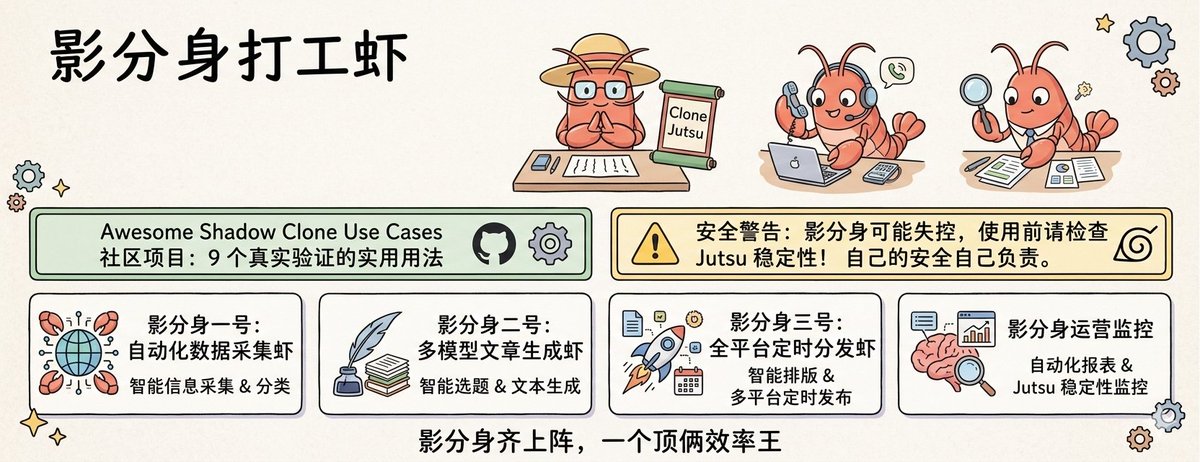
Tip 5: Give lobster a “clone” to double your work efficiency and save money
[Pain points for stepping on pitfalls]
Many people use one lobster to do everything. They use one to write code, set reminders, and change copywriting. As a result, the more they use it, the more chaotic it becomes. They always use the most expensive model to do the most basic tasks, burning money like crazy.
[Practical operation for beginners]
Create 2-3 Agent clones, each performing its own duties. Don’t let one lobster do all the work. The configuration is super simple. Just click “New Agent” in the interface to complete:
- Main clone: Use a better model (such as Claude Sonnet), only do the hard work of writing long articles, making plans, and complex analysis, and load complete personal memories and configurations;
- Lightweight clone: use a cheap model (such as Claude Haiku/domestic MiniMax) to only do chores such as checking the weather, setting reminders, and organizing data, and only load the most streamlined configuration;
- Special clones (built on demand): For example, one who specializes in writing code, or one who specializes in managing family schedules. You don’t need more, just one is enough.
【Actual effect】
Each avatar works accurately, without mess, and answers more professionally. The token consumption is directly reduced by 70%. The more you use it, the more money you save. There is no such thing as “messing up the memory of the main force by doing chores”.
Tip 6: Connect to the mobile phone with one click, Lobster can be used anytime and anywhere
[Pain points for stepping on pitfalls]
Many people think that Lobster can only be used when sitting in front of the computer, and cannot be used when going out. It cannot be used when commuting, walking, or traveling for business, and its capabilities are wasted.
[Practical operation for beginners]
One-click installation method: directly ask Crayfish to search for “Feishu Robot”/”Telegram Robot” related skills on the corresponding platform, install it with one click, and follow the guidance to authorize, and you can talk to Crayfish in Feishu/Telegram on your mobile phone, and can process text, voice, and picture sending;
Independent learning method: There are also many video tutorials on domestic platforms for connecting to Feishu. You can refer to it step by step. I won’t go into details here~
【Actual effect】
You can use lobster anytime, anywhere while commuting, taking a walk, or going on a business trip. Talk about inspiration while walking the dog, and the manuscript will be written when you get home; talk about needs while commuting, and the plan has been sorted out by the company, truly realizing a 24-hour online dedicated assistant.
Tip 7: Don’t panic when reporting an error, you can let the lobster fix it by yourself with just one sentence
[Pain points for stepping on pitfalls]
Xiaobai is most afraid of lobster errors. There is a bunch of English code that he can’t understand and doesn’t know how to fix it. He can only worry about it or even give up.
[Practical operation for beginners]
No matter what error is reported by Lobster, you can directly copy the error content and send it to it. Add this fixed sentence and 90% of the problems will be solved:
The above is the error that occurred when you ran it. Please check the cause of the problem by yourself, provide a directly executable repair plan, and teach me how to operate it step by step. I am a complete novice and do not understand any code. Do not use professional terms.
In most cases, Lobster can find the cause of the error by itself, provide you with fool-proof repair steps, and even directly help you perform repairs, without you having to look up information or gnaw on technical documents yourself.
【Actual effect】
No longer afraid of reporting errors, novices can easily solve 90% of operational problems. There is no need to ask for help everywhere, and they can use it smoothly without knowing the code.
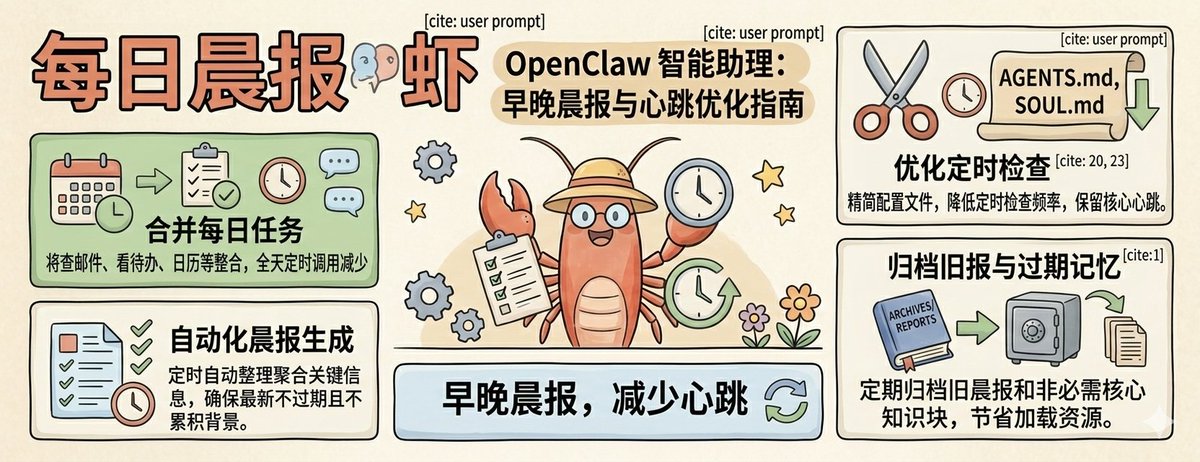
Tip 8: Don’t set up scheduled tasks randomly, merge them into a “daily morning report” to save worry and money
[Pain points for stepping on pitfalls]
Many novices follow the trend and set up a bunch of scheduled tasks, check email every 5 minutes, and look at the calendar every 10 minutes. They do nothing at the end of the day. They just burn the tokens, the bills directly explode, and they also receive a lot of useless reminders, which is annoying to death.
[Practical operation for beginners]
1. Don’t set up a bunch of scheduled tasks separately. Combine all the things you need to check daily into one “daily morning report”. It only runs 1-2 times a day. It is completely sufficient:
- Basic version: Set it up at 7 a.m. every day, and let Lobster help you check “the weather + number restrictions, unread important emails, and today’s schedule to-dos” all at once, organize it into a streamlined morning report, and send it to your WeChat/Feishu;
- Advanced version: There is also a “Daily Evening News” at 8 p.m. to help you summarize today’s work completion, tomorrow’s to-do, and reminders for unanswered messages. It only runs twice a day.
- Ultimate Edition: Tell your lobster your usage habits, let him adjust the heartbeat mechanism, keep silent when you are most likely not using it, and be with you for the first time when you need it.
【Actual effect】
You will no longer be bombarded by messy reminders, token consumption will be directly reduced by 80%, and you will save a lot of money on bills. You can also clearly grasp all matters every day, and you will not miss or forget things.
Tip 9: Add a “human confirmation” link, and you will no longer be afraid of blind operations by lobsters
[Pain points for stepping on pitfalls]
Many people are afraid that there will be problems with the automatic operation of Lobster, such as sending emails randomly, modifying files randomly, and blindly clicking on web pages. They dare not let it automatically run tasks, which wastes its automation capabilities.
[Practical operation for beginners]
To completely resolve your concerns in one move, add this “human confirmation rule” to all instructions, and also install the “Local Approval” skill to protect yourself:
All operations involving sending messages, modifying files, operating external platforms, and spending money must first send me the operation content and potential risks for confirmation. You can only execute it after receiving my clear “agree to execute” reply. Private operations are strictly prohibited.
【Actual effect】
Completely solve the worry of “fear of it operating blindly”, rest assured that it will help you run the automated process, which saves time and will not cause trouble. Even novices can rest assured to use the fully automatic function.
Tip 10: “Train” the lobster regularly and it will understand you better and better
[Pain points for stepping on pitfalls]
Many people just let it work after loading the lobster and never review it. As a result, it repeats the same mistakes it has made and never gets your ideas. The more you use it, the less useful it becomes.
[Practical operation for beginners]
Spend 5 minutes every week to do a “review training” for the lobster. Just speak to it in plain language, such as:
This week, there are three things you did that did not meet my requirements: I asked you to write copy, but you always wrote too official. In the future, you will write in Xiaohongshu colloquial style.
When sorting out the information, don’t give me any unnecessary foreshadowing and go directly to the core content.
Don’t recommend financial management-related content to me without permission, I don’t need it
Always remember the above content and strictly abide by it in all subsequent conversations, so as not to make the same mistake again.
You can also tell it what it has done well and let it continue to do so.
【Actual effect】
Lobster will understand you better the more you use it, mistakes you have made will not be made again, and the replies will become more and more in line with your habits. It will truly become your exclusive assistant. The longer you use it, the more comfortable it becomes.
Don’t be anxious. Use it first and you’ll already win.
Many people find OpenClaw difficult to use because they always pursue sophisticated and complex gameplay, but ignore the most basic tips.
The above 10 techniques can all be used by novices without any threshold. There is no need to understand the code, no need to do complicated configurations, and no need to complete them all. Just use the first 3, and your lobster will be 10 times easier to use.
The charm of OpenClaw has never been about the powerful technical operations it can perform, but that it can follow your use and slowly become a dedicated assistant that understands you best. Start with the simplest tips, and slowly you will find that it can help you do more and more things, and it will truly become an efficiency artifact that helps you save time and energy.
Okay, I hope today’s tips are helpful to you. If you encounter problems when using lobster, leave a message in the comment area and I will help you find a solution~
If my article is helpful to you, you can also follow my official account. Thank you for your support~

source
author:Achuan | AI thinking
Release time: March 4, 2026 09:51
source:Original post link
[…] Getting Out of Novice Village: 10 Zero-Threshold Tips for OpenClaw […]