
Editor’s Brief
OpenAI’s GPT-5.4 marks a shift in frontend development from functional code generation to aesthetic execution. By integrating native visual reasoning and "computer use" capabilities, the model attempts to move past the generic, cookie-cutter layouts that have plagued AI-generated web design. The update emphasizes autonomous self-correction through tools like Playwright and a more nuanced understanding of design systems and "mood" over mere syntax.
Key Takeaways
- Native Visual Reasoning:** The model now incorporates image generation and search directly into the workflow, allowing it to create mood boards and visual references before writing a single line of CSS.
- Autonomous Validation:** Through "computer use" capabilities, the model can deploy Playwright to inspect its own rendered output, identifying layout shifts or broken navigation without human intervention.
- The "Generic Trap" Mitigation:** GPT-5.4 addresses the tendency of LLMs to default to overrepresented, mediocre design patterns by allowing developers to set strict aesthetic constraints and design tokens.
- Reasoning Calibration:** OpenAI suggests that "more reasoning" isn't always better for frontend tasks; lower reasoning levels often prevent the model from over-engineering simple UI components.
导读
OpenAI 官方近期披露了 GPT-5.4 在前端开发领域的显著进化。新模型不仅在视觉审美上有所突破,更通过原生集成图像工具强化了 UI 表现力。文章深入探讨了如何通过精准引导,让模型跳出平庸的“高频模式”陷阱,从而构建出兼具交互美感与生产力标准的现代网页界面。
重点
- GPT-5.4 强化了对 UI 模式的理解,能通过原生图像工具将视觉推理直接融入前端代码的构建流程中。
- 模型在指令模糊时易陷入平庸的通用设计,开发者需利用特定引导技术,平衡传统惯例与创新的视觉层次。
- 新版本侧重于生成具备生产环境水准的代码,支持更细腻的交互细节,旨在缩小 AI 生成与人类创意间的差距。
备注
过去 AI 写前端常被诟病风格僵化,GPT-5.4 试图通过原生多模态能力解决这一痛点。对开发者而言,现在的挑战已从“如何跑通代码”转向“如何精准定义审美边界”。建议关注官方提供的引导技巧,这才是未来 AI 辅助设计的核心竞争力。
编辑评论
看到 OpenAI 开发者博客放出关于 GPT-5.4 在前端设计领域的更新,第一反应是这家公司终于开始正视 AI 生成网页那种挥之不去的“廉价感”了。长期以来,无论是 GPT-4 还是各类开源模型,写出来的网页代码总有一种“虽然能跑,但丑得千篇一律”的通病。这次 GPT-5.4 明确提出要解决视觉层面的平庸感,甚至引入了所谓“视觉推理”和“原生计算机使用”能力,这不仅仅是模型参数的迭代,更像是 OpenAI 试图把 AI 从一个“敲代码的实习生”提拔成“懂审美的全栈工程师”。 我最关注的一点是 GPT-5.4 对“视觉习惯”的克制。原文提到模型在指令不明确时,往往会退回到训练数据中那些高频出现的平庸模式,导致产出的设计缺乏层次感。现在它学会了通过 mood board(情绪板)和多轮视觉方案对比来寻找灵感,这非常像人类设计师的工作流。如果它真的能像文中所说,在理解纽约咖啡文化或 Y2K 美学的基础上,再去构建 UI 细节,那么前端开发的门槛将迎来一次真正意义上的“审美大跃进”。 不过,作为长期观察 AI 产业的编辑,我对官方宣传的“生产环境可用(production-ready)”依然持保留意见。OpenAI 官方博客的可信度自然很高,代表了目前技术的最前沿,但“实验室里的惊艳”和“复杂业务逻辑下的稳健”是两码事。文中提到的 GPT-5.4 能够自主调用 Playwright 这种自动化测试工具进行自我修正,这确实是个巨大的进步——这意味着 AI 开始具备了“回头看一眼”的能力,能自己检查渲染出的页面是不是缺了边框或者导航栏跑偏了。但实际操作中,面对复杂的企业级中后台或者极致性能要求的 C 端产品,这种“自主修正”是否会陷入无限循环的 Token 消耗,目前信息还不够透明。 从产业影响来看,GPT-5.4 这种级别的工具普及后,那些只会搬运组件库、套用模板的初级前端工程师可能会面临毁灭性的打击。当 AI 能够一两轮对话就搞定一个复杂的交互游戏或功能完备的 App 界面,并自带视觉校验时,人类的价值将迅速向“定义约束”和“决策审美”收缩。它不再是帮你写一个 CSS 函数,
GPT-5.4 is a better web developer than its predecessors—generating more visually appealing and ambitious frontends. Notably, we trained GPT-5.4 with a focus on improved UI capabilities and use of images. With the right guidance, the model can produce production-ready frontends incorporating subtle touches, well-crafted interactions, and beautiful imagery.
Web design can produce a large surface area of outcomes. Great design balances restraint with invention—drawing from patterns that have stood the test of time while introducing something new. GPT-5.4 has learned this wide spectrum of design approaches and understands many different ways a website can be built.
When prompts are underspecified, models often fall back to high-frequency patterns from the training data. Some of these are proven conventions, but many are simply overrepresented habits we want to avoid. The result is usually plausible and functional, but it can drift toward generic structure, weak visual hierarchy, and design choices that fall short of what we visualize in our heads.
This guide explains practical techniques for steering GPT-5.4 toward crafting the designs you envision.
While GPT-5.4 improves across a range of axes, for front-end work we focused on three practical gains:
GPT-5.4 was trained to use image search and image generation tools natively, allowing it to incorporate visual reasoning directly into its design process. For best results, instruct the model to first generate a mood board or several visual options before selecting the final assets.
You can guide the model toward strong visual references by explicitly describing the attributes the images should capture (e.g., style, color palette, composition, or mood). You should also include prompt instructions that guide the model to reuse previously generated images, call the image generation tool to create new visuals, or reference specific external images when required.
The model was trained to develop more complete and functionally sound apps. Expect the model to be more reliable over long-horizon tasks. Games and complex user experiences you previously thought were impossible are a reality in one or two turns.
GPT-5.4 is our first mainline model trained for computer use. It can natively navigate interfaces, and combined with tools such as Playwright, it can iteratively inspect its work, validate behavior, and refine implementations—enabling longer, more autonomous development workflows.
Watch our launch video to see these capabilities in action.
Playwright is particularly valuable for front-end development. It allows the model to inspect rendered pages, test multiple viewports, navigate application flows, and detect issues with state or navigation. Providing a Playwright tool or skill significantly improves the likelihood that GPT-5.4 produces polished, functionally complete interfaces. With improved image understanding, it also provides a way for the model to verify its work visually and check that it matches the reference UI if provided.
If you adopt only a few practices from this document, start with these:
Here’s a prompt to get started.
Define constraints such as one H1 headline, no more than six sections, two typefaces maximum, one accent color, and one primary CTA above the fold.
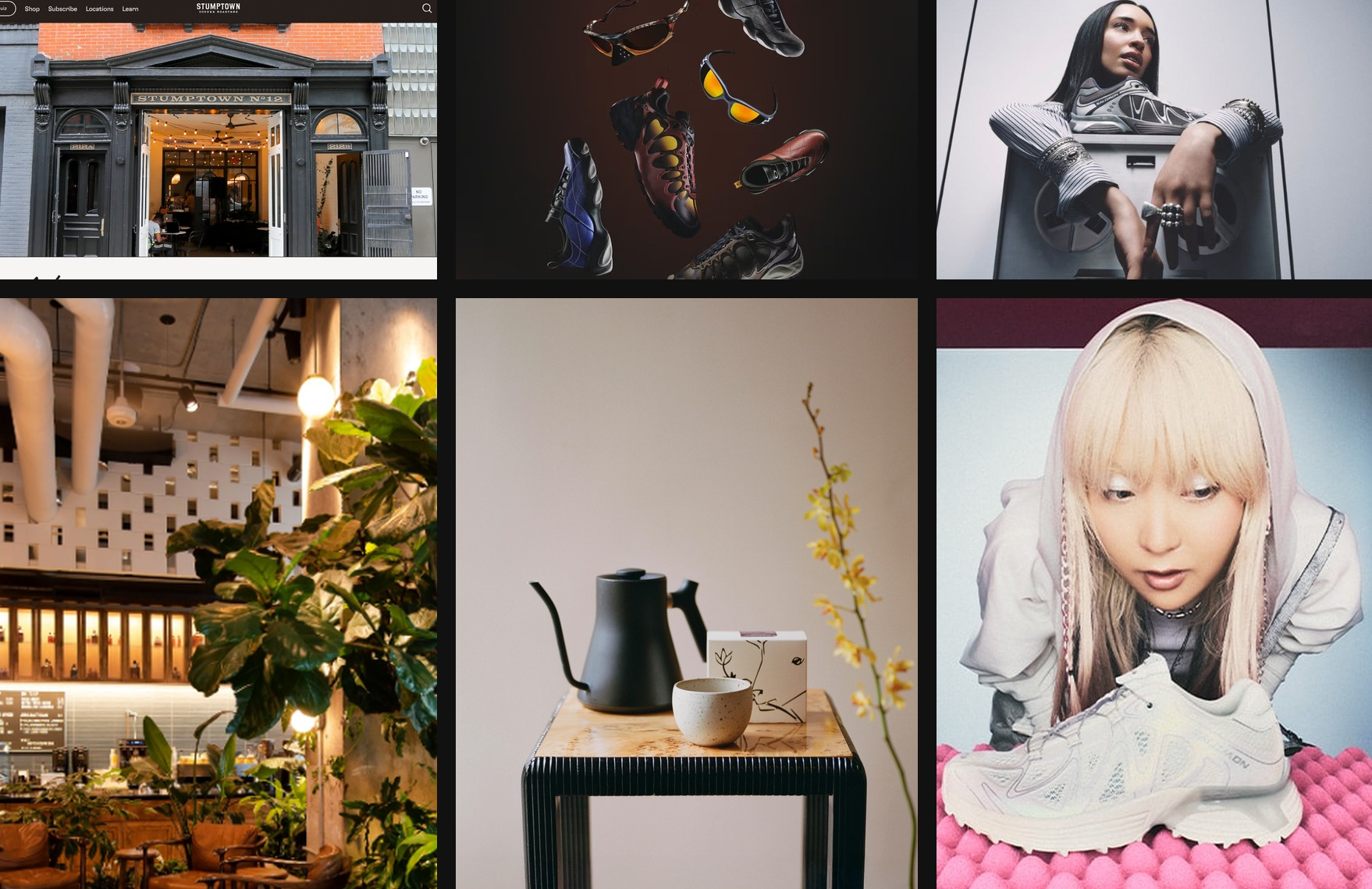
Reference screenshots or mood boards help the model infer layout rhythm, typography scale, spacing systems, and imagery treatment. Below is an example of GPT-5.4 generating its own mood board for the user to review.
Mood board created with GPT-5.4 in Codex inspired by NYC coffee culture and Y2K aesthetics
Mood board created with GPT-5.4 in Codex inspired by NYC coffee culture and Y2K aesthetics
Typical marketing page structure:
Encourage the model to establish a clear design system early in the build. Define core design tokens such as background, surface, primary text, muted text, and accent, along with typography roles like display, headline, body, and caption. This structure helps the model produce consistent, scalable UI patterns across the application.
For most web projects, starting with a familiar stack such as React and Tailwind works well. GPT-5.4 performs particularly strongly with these tools, making it easier to iterate quickly and reach polished results.
Motion and layered UI elements can introduce complexity, especially when fixed or floating components interact with primary content. When working with animations, overlays, or decorative layers, it helps to include guidance that encourages safe layout behavior. For example:
For simpler websites, more reasoning is not always better. In practice, low and medium reasoning levels often lead to stronger front-end results, helping the model stay fast, focused, and less prone to overthinking, while still leaving headroom to turn reasoning up for more ambitious designs.
Providing the model with real copy, product context, or a clear project goal is one of the simplest ways to improve front-end results. That context helps it choose the right site structure, shape clearer section-level narratives, and write more believable messaging instead of falling back to generic placeholder patterns.
To help people get the most out of GPT-5.4 on general front-end tasks, we’ve also prepared a dedicated frontend-skill you can find below. It gives the model stronger guidance on structure, taste, and interaction patterns, helping it produce more polished, intentional, and delightful designs out of the box.
Install the frontend-skill by running the following command inside the Codex app:
来源
来源:原文链接

Editorial Comment
For the last two years, the dirty secret of AI-assisted frontend development has been the "uncanny valley" of UI. We’ve all seen it: the perfectly functional, yet soul-crushingly boring React components that look like a generic SaaS template from 2016. It’s what the industry calls the "high-frequency pattern" trap. Because the training data is saturated with mediocre Bootstrap clones, the AI defaults to the path of least resistance. With the announcement of GPT-5.4, OpenAI is finally admitting that "code that runs" is no longer the benchmark—the benchmark is "code that looks like a human designed it."
The most significant technical leap here isn't actually the code generation itself, but the integration of "computer use" via Playwright. Historically, an LLM writes code in a vacuum. It has no idea if that `z-index: 9999` actually buried the navigation bar or if a flexbox container collapsed on mobile. By allowing the model to "see" and interact with a rendered browser instance, OpenAI is closing the feedback loop. This is the difference between an intern who hands you a broken file and an engineer who checks their work in Chrome before submitting a PR. The ability to self-correct based on visual output is a massive step toward "production-ready" automation.
However, we should be wary of the "mood board" hype. While the idea of a model understanding "NYC coffee culture" or "Y2K aesthetics" sounds impressive in a blog post, translating a vibe into a maintainable CSS architecture is notoriously difficult. The real value for senior developers lies in the "design tokens" approach mentioned in the documentation. By forcing the model to define a core palette, typography scale, and spacing system upfront, we are essentially building a sandbox for the AI. It prevents the model from hallucinating random hex codes or inconsistent padding across different sections of the site.
There is also a fascinating bit of counter-intuitive advice in the release: the suggestion to use *lower* reasoning levels for simpler frontend tasks. In the race to build "smarter" models, we’ve reached a point where high-level reasoning can actually lead to over-engineered, brittle code. For a standard marketing hero section, you don't need a model to contemplate the mysteries of the universe; you need it to stay focused on clean HTML and utility-first CSS. It’s a rare moment of pragmatism from a lab that usually pushes for "more parameters, more logic."
From an editorial perspective, this update signals a shift in the labor market for frontend engineers. The "Code Monkey" era is officially ending. If a model can generate a functional, visually verified, and aesthetically coherent interface in two turns, the value of a developer who simply "knows React" drops to near zero. The premium is shifting toward "design literacy." The developers who thrive in the GPT-5.4 era will be those who can define the constraints, curate the visual references, and act as a creative director rather than a keyboard operator.
Ultimately, GPT-5.4 is OpenAI’s attempt to bridge the gap between the "lab-grown" look of AI sites and the bespoke feel of professional design. It’s a sophisticated tool, but it still requires a human with a sense of taste to keep it from drifting back into the sea of generic digital noise. The tool can now use the browser, but the human still has to tell it where to go.